Docs Assist: A Technical Writing Aide
I rewrote the Pi-hole documentation on my site in mid-March. Since then, according to metrics from Clarity, AI assistants have cited it over 3,000 times to answer other people’s questions.
Strangers, mid-troubleshooting, asking their AI so how do i know if pihole works, getting 403 forbidden when trying to access pihole for the first time, and now ti says forbiden.
If you were the one who found me via i only have the physical pi and a blank micro sd card, I hope I helped guide you, whoever you are.
I’ve been that person, often late at night, SSHing into my Raspberry Pi and trying to figure out why there’s No space left on device when there’s definitely space left on the device.
Or worse, searching my spare parts bins for a working microSD card.
That’s what prompted my rewrite earlier this year. An unresponsive microSD card and an echo of “why isn’t the Internet working?” That, and my traffic analytics said I was getting a lot of traffic to a single page and nearly everyone who visited bounced to a site I linked to.
Now, for queries about Pi-hole block lists, my pages show up in about a third of AI answers.
For pihole backup, it’s 100%.
My whole job as a technical writer has always been to anticipate what someone needs, and to make sure they find their answer in the first place they look for it. I didn’t write those docs for AI. I wrote them for me and for the greater good of the Internet.
My personal site’s docs are just here to help - they don’t sell anything. Humans trust documentation that actually solves their problem, and tend to shy away from documentation that feels like it’s been padded or trying to sell something. AI has the same calibration. Research on generative-engine visibility found that citing sources and adding statistics improved how often AI systems surfaced a page (👀), while keyword stuffing, the classic SEO move, did essentially nothing. The AI citations here are a side effect of that trust.
The goal is still, and always, empowering the end user.
How Much of Technical Writing Is Writing?
Section titled “How Much of Technical Writing Is Writing?”Ask any technical writer how they spend their time.
Writing is often the smallest portion.
The job includes:
- Reading PRDs and the codebase to find what’s real.
- Interviewing the engineer who built the feature and the support teams who know where the issues arise.
- Running through each step to make sure I didn’t miss anything.
- Digging through Slack threads searching for concurring opinions.
- Working through how the feature relates to other documentation, and finding the best way to surface it to the reader.
- Running through the steps again.
The industry pitch for AI in documentation is aimed almost entirely at the writing part.
“AI will write your docs” is a promise that won’t resolve the core bottleneck. Writing code and writing documentation are both separate and time-consuming. Often, the code gets included in the definition of “done,” and the documentation chases after.
A technical writer is a developer, too. Not of software, but of structured information: curation, synthesis, information architecture, judgment.
Which facts are true. Which facts matter. What shape the whole thing should take so it stays usable as it grows.
How to make sure someone can find it when they need to.
These are decisions.
My Pi-hole documentation gets cited because of decisions I made in writing it. The troubleshooting page exists because I went through a bunch of Reddit and Stack Overflow posts, and because I dug through GitHub issues. I redesigned my own Pi-hole deployment so that I could help the people who landed on the allow list page find their answer rather than bouncing.
I’ve been a cheerleader for helping subject matter experts document their knowledge for a long time. That’s a first step in documentation (write it down), and it’s technical writing. They should own that proudly. A technical writer is someone who makes that documentation better.
I made a Claude Code plugin to help more people do more technical writing.
Docs Assist
Section titled “Docs Assist”Docs Assist is a Claude Code plugin that coaches people through writing documentation.
It’s for anyone who has the knowledge but not the job title or the time. For the product owner who knows what got built and the support teams who know they need a doc more than they need another internal page or snippet.
It’s also for technical writers, working solo or on small teams, who need to cover more ground than headcount allows.
It asks what you know and what you need, takes your answers in any order, reflects them back so you can correct them, and then handles the structure, formatting, cross-references, and consistency. It delivers a workable draft with less anxiety.
If you can’t tell your Glossary from your Quickstart, it helps you choose a template from The Good Docs Project.
Docs Assist Documented Itself
Section titled “Docs Assist Documented Itself”I built the plugin collaboratively with Claude Code.
My documentation workflow and ideals shaped the plugin. I dumped in what I know and guided the process. Claude Code turns out to be genuinely good at this kind of work, writing prompts to help guide future Claude Code sessions.
I asked it to help improve its own README:
Me: Help me update the README with great docs about this plugin. Where do I start?
Docs Assist: Let me read it back first. The README is solid, but it tells more than it shows, it opens with a rename note that only old users care about, and the file tree has drifted from the code (it’s missing two files). Start with one thing: a short “What it looks like” example near the top, because that’s what turns a scroller into someone who tries it. Then move the rename note down and fix the tree. I’ll ship those three now.
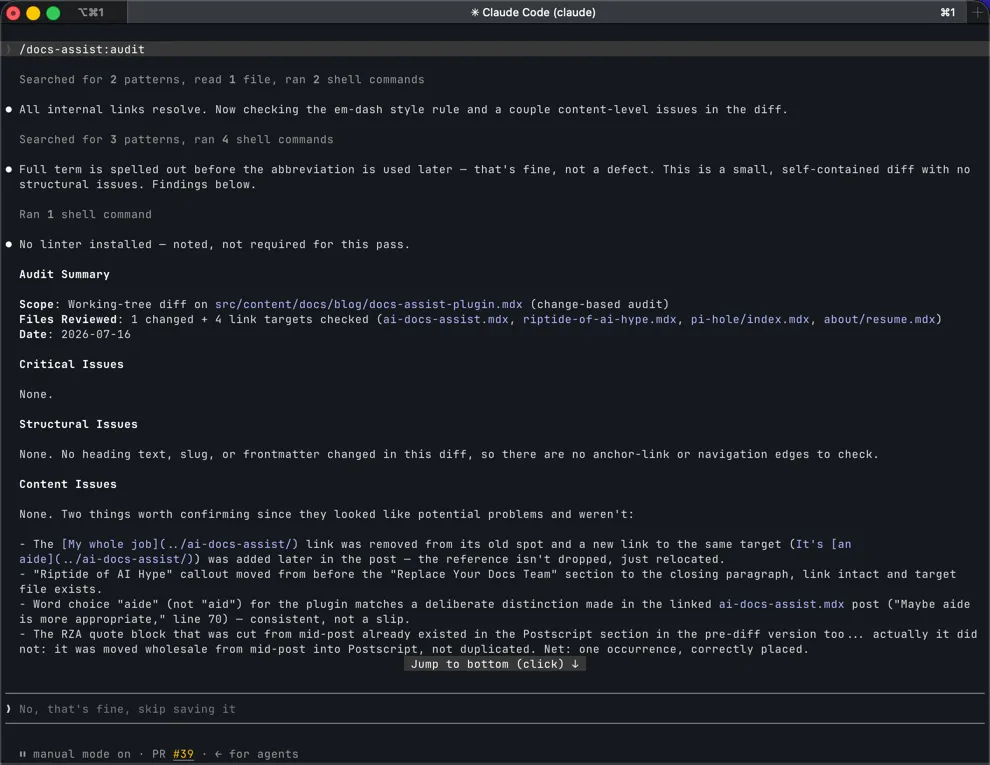
Today, I ran an audit against this post’s branch:
How to Use the Docs Assist Claude Code Plugin
Section titled “How to Use the Docs Assist Claude Code Plugin”-
From inside Claude Code:
Terminal window /plugin marketplace add EdwardAngert/docs-agent-plugin/plugin install docs-assist@docs-assist-marketplace -
Restart Claude Code, then if you’re in a repository with existing docs:
Terminal window /docs-assist:healthIt puts together a scorecard of your docs, coverage, freshness, consistency, and findability. It identifies some high-leverage fixes and offers to make them.
The plugin activates when you start discussing documentation, or you can call it directly:
/docs-assistIt asks what you know, takes the brain dump in any order, marks the parts you’re unsure about for verification instead of papering over them, and produces a structured draft. You review for accuracy.
Use Docs Assist to Prepare Agent-ready Docs
Section titled “Use Docs Assist to Prepare Agent-ready Docs”The thread this post opened with:
/docs-assist:agent-readyIt creates or repairs llms.txt, completes the frontmatter that helps machines find the right page, and records your repo’s conventions where the next tool will look for them.
The full command list, team configuration, and linting setup are in the plugin’s own docs.
How the Docs Assist Claude Code Plugin Works
Section titled “How the Docs Assist Claude Code Plugin Works”One design decision drives the mechanics: use the LLM only where judgment is required, and use deterministic tools everywhere else.
Keep Writing Rules and Lint Rules in One File
Section titled “Keep Writing Rules and Lint Rules in One File”/docs-assist:init commits a .docs-assist/config.yml to your repo: heading case, list markers, no em dashes, the frontmatter fields your docs already use.
The agent reads that file when it drafts.
/docs-assist:setup-lint generates the Vale and markdownlint configs from the same file, and extends any linter you already run instead of replacing it.
Change a rule once and both the writing and the CI checks follow. They can’t drift apart, because there’s nothing to drift between.
Update Every Affected Doc in Parallel
Section titled “Update Every Affected Doc in Parallel”When code changes, /docs-assist:update reads the diff, greps the docs for the symbols that changed, and separates the docs that document a renamed flag from the ones that mention a term in passing.
For a large change, it launches a subagent for each affected doc, in parallel. Each subagent is constrained to edit only what the diff requires and to flag anything it can’t confirm for human review instead of guessing.
Detect Docs Impact in CI Without Calling a Model
Section titled “Detect Docs Impact in CI Without Calling a Model”The optional pull-request check is a dependency-free script that never calls a model or the network.
It classifies each diff against the change types that break docs: moved files, edited headings, changed code terms the docs mention, a large source change with no docs touched.
Then it leaves one comment saying exactly which range to hand to /docs-assist:update.
Detection is AI-free and runs on every PR. The expensive step runs only when a human decides it’s worth it.
That’s the same judgment call the whole post is about, applied to the tool itself.
(And yes, Docs Assist documented this section. I checked its claims against the code the way I’d check any SME’s draft.)
Replace Your Docs Team With This One Weird Plugin
Section titled “Replace Your Docs Team With This One Weird Plugin”It probably won’t replace a technical writer, which is good, because I still need a job. But it does cover some of the tasks that slow an SME contributor and a technical writer down.
Every hour I don’t spend fixing nested markdown or looking for the most recent Slack conversation that decided a naming convention is time I can spend on the work that made those 3,000+ citations happen: knowing my audience and developing the architecture that gets them what they need.
Whether the last hop to that human is a search engine, a docs site, or an AI reading on their behalf, I’m happy knowing they got their answer.
I’m writing this immediately after my post about the riptide of AI hype and how real capability is buried under an industry selling a deck of universal fixes. This plugin is not a universal fix. It’s an aide. It’s a real AI capability and a real human-AI collaboration that’s worth the hype.
Postscript
Section titled “Postscript”Knowledge is the foundation. Without it you can’t build. (Thanks RZA)
While I was writing this, sending Claude off to find backup sources and references I could use, I (yes, I, not Claude) found that Fabrizio Ferri Benedetti had already written much of this argument, better sourced and a step ahead. Fitting that someone already documented their thoughts and approach. Everyone else gets to benefit and build upon it.
Try out the plugin and report back. It’s open source, Apache 2.0, and actively evolving.
I’d love to hear about what you do with it.