Add Blocklists and Allowlists to Pi-hole
Pi-hole v6 manages blocklists and allowlists natively through the web interface or command line.
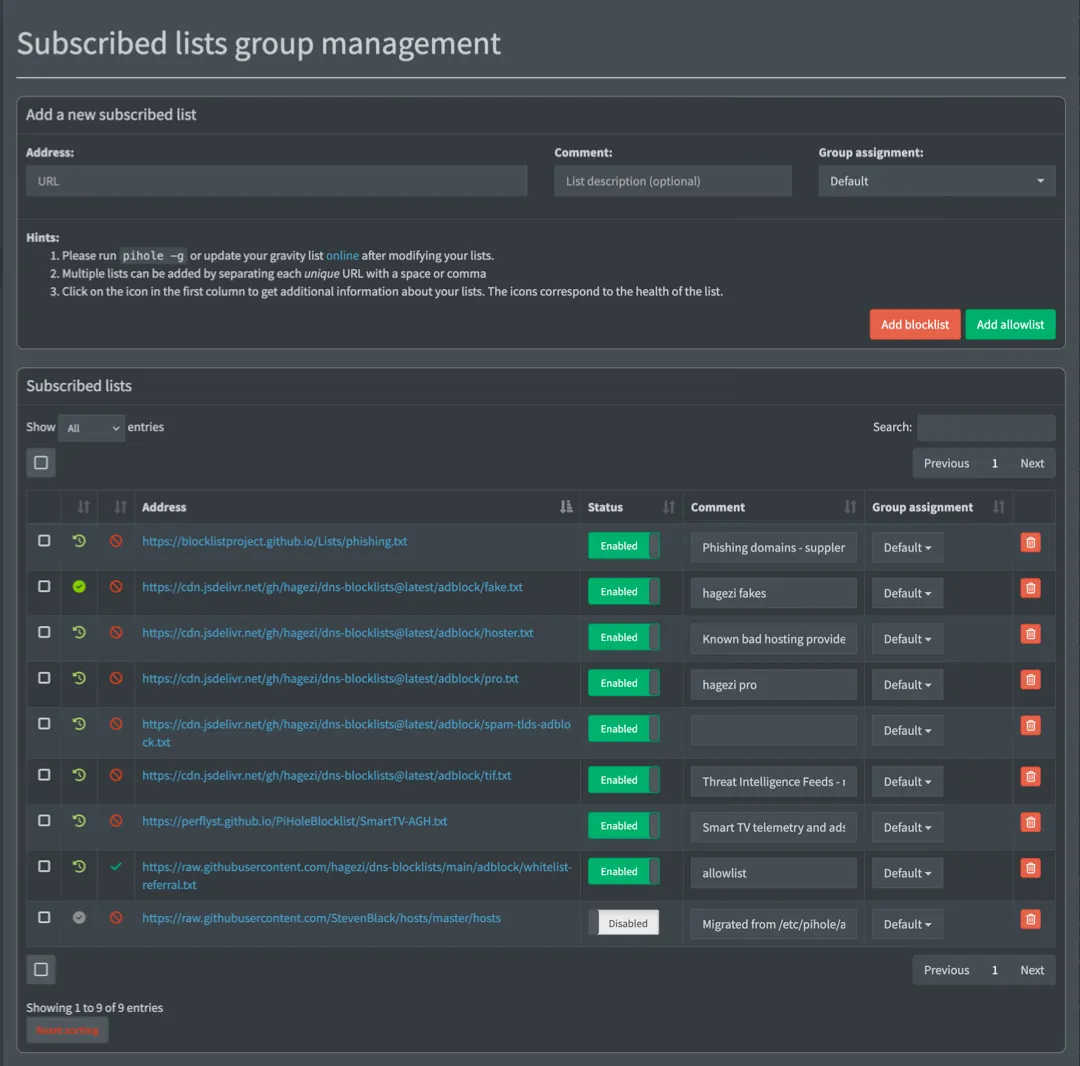
Blocklists tell Pi-hole which domains to block. Allowlists tell it which ones to always let through, even if they match an entry on the blocklist.
A bigger blocklist isn’t necessarily better and can cause issues for day-to-day browsing or streaming. Many services depend on domains that look like tracking but are required to work.
Most streaming apps run a verification chain on launch: they contact telemetry or analytics domains, and if those fail, the streaming app refuses to play content. This can be frustrating and has led to a number of “why isn’t the TV working” complaints in my house.
If you’re just here to add lists, you can skip to these sections:
- Add Blocklists to Pi-hole
- Add Allowlists and Domains to Pi-hole
- Fix Streaming Services and Other Broken Sites
How to choose the best Pi-hole blocklist
Section titled “How to choose the best Pi-hole blocklist”The two most-recommended Pi-hole blocklists are HaGeZi and OISD. Both are well-maintained, low-false-positive options.
The difference is how much control you want:
OISD Big is a single URL, maintained by one person, optimized for zero breakage.
If you want to set it and never think about it again, use https://big.oisd.nl/.
HaGeZi aggregates over 200 upstream sources including OISD, EasyList, EasyPrivacy, URLhaus, and Phishing Army into tiered lists you can dial up or down. At the Normal tier it’s comparable to OISD Big. At Pro and above it blocks significantly more, and OISD is still included as an upstream source. HaGeZi also offers supplementary category lists (threat intelligence, spam TLDs, smart TV telemetry) that don’t have OISD equivalents.
This guide uses HaGeZi because the tiered approach balances between “fewest possible issues” and “maximum blocking,” and the supplementary lists add coverage that a single all-in-one list can’t match.
Most of the setup in this guide relies on one maintainer.
Six of the lists below come from HaGeZi. If the project goes inactive, the supplementary lists (Perflyst Smart-TV, BLP Phishing) will keep working, but the core blocklist won’t update. OISD Big is a natural, and still excellent, fallback.
Choose a HaGeZi tier
Section titled “Choose a HaGeZi tier”-
HaGeZi Normal
- Balanced blocking with minimal false positives. Good for environments where there’s no admin nearby to unblock something.
-
HaGeZi Pro
-
Good coverage, manageable breakage (this guide uses this) More aggressive than “Normal,” but still reasonable for daily use.
Occasionally blocks something legitimate. Check the query log when something breaks.
-
-
HaGeZi Pro++
- HaGeZi recommends this for experienced users with an admin available to troubleshoot.
For quick reference, the full tier progression is: Light > Normal > Pro > Pro++ > Ultimate. See HaGeZi’s README for descriptions of each.
Recommended blocklists
Section titled “Recommended blocklists”If you enabled the default blocklist or previously used The Firebog, StevenBlack/hosts, or 1Hosts, you can disable them in favor of the lists on this page.
HaGeZi already includes these as upstream sources. They can create duplicate entries without providing additional coverage. Pi-hole deduplicates during Gravity updates so it won’t break anything, but it’s unnecessary weight.
-
Choose one core HaGeZi list:
-
HaGeZi Normal
https://cdn.jsdelivr.net/gh/hagezi/dns-blocklists@latest/adblock/multi.txt -
HaGeZi Pro (recommended)
https://cdn.jsdelivr.net/gh/hagezi/dns-blocklists@latest/adblock/pro.txt -
HaGeZi Pro++
https://cdn.jsdelivr.net/gh/hagezi/dns-blocklists@latest/adblock/pro.plus.txt
-
-
Optional: Choose any supplementary lists (use with either tier):
-
HaGeZi TIF
Threat Intelligence Feeds - malware, phishing, cryptojacking
https://cdn.jsdelivr.net/gh/hagezi/dns-blocklists@latest/adblock/tif.txt -
HaGeZi Bad Hoster
Blocks entire hosting providers that repeatedly host malware in user-uploaded content, not individual bad domains. Legitimate sites sharing that hosting get blocked too, with no built-in path to unblock just the one you need. HaGeZi scopes this list for high-security environments, not casual use. Skip it unless you’re prepared to hand-unblock the occasional legitimate site yourself.
https://cdn.jsdelivr.net/gh/hagezi/dns-blocklists@latest/adblock/hoster.txt -
HaGeZi Anti-Piracy
Piracy-related domains
https://cdn.jsdelivr.net/gh/hagezi/dns-blocklists@latest/adblock/anti.piracy.txt -
HaGeZi Spam TLDs
Entire TLDs with no legitimate traffic
https://cdn.jsdelivr.net/gh/hagezi/dns-blocklists@latest/adblock/spam-tlds-adblock.txt -
Smart-TV Blocklist
Smart TV telemetry and ads
https://perflyst.github.io/PiHoleBlocklist/SmartTV-AGH.txt -
BLP Phishing
Phishing domains - supplements HaGeZi TIF
https://blocklistproject.github.io/Lists/phishing.txt
-
Not listed above, but worth knowing about:
- HaGeZi NRD/DGA list
- Blocks newly registered and algorithmically generated domains, a category that malware command-and-control infrastructure relies on. This can improve your security posture, but can lead to more false positives.
Add blocklists to Pi-hole
Section titled “Add blocklists to Pi-hole”To add a list:
-
Log in to the Pi-hole web interface at
https://pi-hole.local/admin. -
Go to Lists.
-
Paste a list URL, then select Add blocklist.
-
After you add all the lists, update the Pi-hole’s list settings (what it calls “Gravity”) in Tools > Update Gravity to apply them, or use the CLI:
From the Pi sudo pihole -gGravity also runs automatically on a weekly schedule.
Add allowlists and domains to Pi-hole
Section titled “Add allowlists and domains to Pi-hole”Pi-hole v6 offers two ways to allowlist:
- List subscriptions: Subscribe to a URL and Pi-hole manages it automatically, like a blocklist. Best for maintained collections of domains.
- Individual domain entries: Add a single domain directly in Domains > Allowlist in the web interface. Best for one-off fixes when a specific service breaks.
Subscribe to a referral allowlist
Section titled “Subscribe to a referral allowlist”The HaGeZi Referral Allowlist is a maintained collection of domains that blocklists commonly block but that services legitimately need. Adding it as a subscription prevents a large category of false positives before they happen.
-
In the Pi-hole web interface, go to Lists.
-
Paste the allowlist:
https://cdn.jsdelivr.net/gh/hagezi/dns-blocklists@latest/adblock/whitelist-referral.txt -
Select Add allowlist.
-
After you add all the lists, update Gravity in Tools > Update Gravity to apply them, or use the CLI:
From the Pi sudo pihole -gGravity also runs automatically on a weekly schedule.
Add an individual domain to the allowlist
Section titled “Add an individual domain to the allowlist”Instruct Pi-hole to allow individual domains.
If you encounter an error with a website or service, check the query log at https://pi-hole.local/admin/queries.
Select Advanced filtering to filter by client or domain and sort by time.
After you find the domain, select Allow to add the domain to the allowlist.
See Troubleshoot a Broken Service for tips.
Fix streaming services and other broken sites
Section titled “Fix streaming services and other broken sites”If a service stops working after you set up Pi-hole, the likely cause is a blocked domain. The sections below list known fixes for common services.
If your service isn’t listed below, see Troubleshoot a Broken Service for how to find the blocked domain yourself.
You can use the Pi-hole dashboard to add multiple domains one at a time through the Domains section at https://pi-hole.local/admin/groups/domains.
The CLI allows you to add multiple domains in the same command.
For each service in the sections below, you can copy the domains from the table into the dashboard, or run the pihole allowlist command.
Run the command for the services you use, then run sudo pihole -g to apply the changes.
Domains can change.
Streaming services update their CDN and analytics infrastructure regularly. If a service breaks again after you’ve already allowlisted it, check the query log for newly blocked domains.
Disney+
Section titled “Disney+”sudo pihole allowlist geolocation.onetrust.com registerdisney.go.com global.edge.bamgrid.com disney.demdex.net| Domain | Why it’s needed |
|---|---|
geolocation.onetrust.com | Geolocation and rights verification - checked on launch |
registerdisney.go.com | Authentication - needed at sign-in and on app launch |
global.edge.bamgrid.com | Core streaming CDN |
disney.demdex.net | Audience/identity service - blocks cause content to fail to load |
Update (2026-08): with this guide’s HaGeZi Pro tier or higher active, Disney+ has played with no ads at all across several viewing sessions on this network. See the update note under Hulu below - the same mechanism appears to apply to both services.
TestedRequired for ad-supported plans.
On Hulu’s ad-supported plan, ad-serving domains share infrastructure with content delivery. This is server-side ad insertion (SSAI): the ads are stitched into the video stream before it reaches your device, so there is no separate ad request for Pi-hole to answer.
If you block the shared video-delivery domain itself, you break playback entirely rather than removing the ads, because the ad and the show are the same stream. There’s no ad-only piece of that stream to leave blocked while allowing the rest.
sudo pihole allowlist geolocation.onetrust.com| Domain | Why it’s needed |
|---|---|
geolocation.onetrust.com | Same geolocation check as Disney+ |
Update (2026-08): blocking a different, unrelated set of domains now appears to suppress the ads entirely, without touching the video-delivery domain above. Confirmed across several viewing sessions: with this guide’s HaGeZi Pro tier or higher active, Hulu and Disney+ both now play with no ads at all, and playback is unaffected. The likely mechanism: both apps check in with an analytics/QoS SDK (Conviva, Braze) before deciding whether to insert a targeted ad, and appear to skip the ad rather than fall back to blocking playback if that check fails. That’s likely to change.
braze.com and conviva.com are both already on HaGeZi’s Pro tier (pro.txt), not just Pro++ - if you’re on Pro or above, you already have this without doing anything. If you’re on a lighter tier (Normal or below) and want to try this deliberately, block the two domains directly (their wildcard form covers every subdomain, so there’s no need to chase the exact one your device happens to use):
sudo pihole --wild braze.com conviva.comCaveats, in order of how much they matter:
- This is one household’s results over several viewing sessions, not verified across other devices, regions, plans, or Hulu/Disney+ app versions.
- Blocking analytics domains to suppress ads is a side effect of how these apps handle a failed dependency, and will stop working the moment either service tightens that failure mode.
- If it stops working for you, the browser-extension option below is unaffected by any of this, since it doesn’t depend on the same mechanism.
You can use the web player: Browser extensions can still strip Hulu’s ads, because they operate on the page rather than on DNS. uBlock Origin on Firefox and AdGuard both handle it.
Paramount+
Section titled “Paramount+”Paramount+ uses Google’s Dynamic Ad Insertion, documented by Google as stitching ad pods directly into the content stream server-side. Fixing playback requires allowlisting Google ad infrastructure domains, which defeats the purpose of Pi-hole.
The better fix is to put the Paramount+ device in a bypass group so it skips filtering entirely. See Skip Pi-hole for a Specific Device below.
If you would rather keep filtering on, community lists report that blocking enduser.adsrvr.org and pagead2.googlesyndication.com removes some Paramount+ ads without breaking playback.
saa.paramountplus.com and vod-gcs-cedexis.cbsaavideo.com must stay allowed.
This is partial at best: the server-stitched ads still get through.
Compiled from the ozankiratli streaming whitelist gist and Google’s Dynamic Ad Insertion documentation. (Accessed July 28, 2026.)
YouTube
Section titled “YouTube”Pi-hole cannot effectively block YouTube video ads.
Google serves ads and content from the same domains and there is no DNS-level way to separate them. Pi-hole can block some banner ads on the YouTube website, but pre-roll and mid-roll video ads are unaffected. This is a fundamental limitation of DNS-based blocking, not a configuration problem.
What does work: it depends on where you watch.
- In a browser: an extension like uBlock Origin.
- On a TV: SmartTube, an open-source replacement YouTube client for Android TV, Google TV, Fire TV, and Nvidia Shield. It removes ads and integrates SponsorBlock to skip in-video sponsor segments. It has to be sideloaded, because it is not in the app stores. (Accessed July 28, 2026.)
- A patched app: ReVanced patches the official YouTube app, but it breaks whenever YouTube changes its API and needs manual re-patching, so it is higher maintenance than SmartTube.
None of these are DNS-level fixes. They replace or modify the client instead, which is the only layer where YouTube’s ads and content can still be told apart.
Netflix, Max, Apple TV+
Section titled “Netflix, Max, Apple TV+”These services generally work without individual domain allowlisting. If thumbnails fail to load or playback fails, check the query log for blocked CDN domains and allowlist as needed.
Samsung Smart TVs
Section titled “Samsung Smart TVs”These domains are required for the Smart Hub, app downloads, and basic platform functionality. Blocking them can break the entire app ecosystem, not just one service. If the TV reports no internet connection or the Apps screen won’t open, one of these is blocked.
sudo pihole allowlist cdn.samsungcloudsolution.com lcprd1.samsungcloudsolution.net time.samsungcloudsolution.net time.samsungcloudsolution.com osb.samsungqbe.com| Domain | Why it’s needed |
|---|---|
cdn.samsungcloudsolution.com | General platform functionality |
lcprd1.samsungcloudsolution.net | App store access and Smart Hub content |
time.samsungcloudsolution.net | Time sync. Without it the TV decides it has no internet |
time.samsungcloudsolution.com | Same role, older sources cite this TLD. Allowlisting both is harmless |
osb.samsungqbe.com | Required by some apps |
Sources disagree on whether the time-sync domain is .net or .com, so the command above allows both.
Note that this allowlists the specific subdomains, not the bare samsungcloudsolution.com.
Blocking the bare domain without allowing these subdomains is what breaks the platform.
Compiled from techjunctions’ Samsung TV ad blocker guide (updated April 2026) and Perflyst/PiHoleBlocklist issue #10. (Accessed July 28, 2026.) Not tested on my own hardware.
Amazon Fire TV / Fire Stick
Section titled “Amazon Fire TV / Fire Stick”Fire TV uses a captive-portal check to decide whether it has internet. If that check is blocked, the device shows a network error or hangs on the home screen.
sudo pihole allowlist fireoscaptiveportal.com firetvcaptiveportal.com dp-discovery-na-ext.amazon.com| Domain | Why it’s needed |
|---|---|
fireoscaptiveportal.com | Connectivity check. Blocks cause “no internet” errors |
firetvcaptiveportal.com | Second connectivity-check domain, polled roughly every two minutes |
dp-discovery-na-ext.amazon.com | App discovery and store |
Both captive-portal domains are real, separately registered through Amazon’s corporate registrar, and still actively maintained: fireoscaptiveportal.com was created in 2017 and firetvcaptiveportal.com in 2020, and both had registration records updated in 2026.
Guidance differs on which one a given device generation uses, and allowing both costs nothing.
fireoscaptiveportal.com comes from hkamran80’s smart TV blocklist, which removed it after a user reported it breaking their Fire Stick with a network error.
Neither captive-portal domain appears in the current smart-tv.txt, which is the evidence for allowing them.
That list was last updated in September 2025, so treat it as stable rather than actively curated.
firetvcaptiveportal.com was never on that list to begin with.
It’s included here on the registration evidence above and on wider community reports.
(Sources and domain registrations re-checked August 23, 2026.) Not tested on my own hardware.
Community-reportedRoku is the most awkward device on this list, because it fights back in two ways.
It hardcodes Google’s DNS. Roku ignores the DNS server your router hands out and talks to 8.8.8.8 and 8.8.4.4 directly, so Pi-hole never sees its queries.
Bringing it back under filtering requires a redirect at the router, not the Pi.
See Force Devices That Ignore Router DNS to Use the Pi-hole.
Some ads aren’t DNS-delivered at all. The home screen banner and screensaver ads can be reduced but not removed, because parts of them ship with the platform rather than being fetched per-view. Roku’s own Settings > Privacy options cut more of them than any blocklist does.
What you can block and allow:
| Domain | Action | Why |
|---|---|---|
display.ravm.tv | Block | Home screen banner and screensaver ads |
api.roku.com | Allow | Core system functionality |
rokutime.com | Allow | Time sync |
therokuchannel.roku.com | Allow | The Roku Channel, if you use it |
Blocked telemetry domains are also what cause apps to load with no thumbnails, or video that won’t start. If that happens, use the query log method above rather than guessing, because the exact domains vary by region and Roku model.
Compiled from the ozankiratli streaming whitelist gist and cybernews’ Roku ad blocking guide. (Accessed July 28, 2026.) Not tested on my own hardware.
Monday.com
Section titled “Monday.com”HaGeZi Pro blocks two real monday.com domains: ei.monday.com and track-visit.monday.com.
Both are tracking endpoints, but ei.monday.com also carries in-app signaling the app depends on, such as marking an export job as finished.
Blocking it can make features like PDF export hang instead of failing with a clear error.
sudo pihole allowlist ei.monday.com| Domain | Why it’s needed |
|---|---|
ei.monday.com | Event-ingestion endpoint also used for in-app signaling |
track-visit.monday.com is also blocked by HaGeZi Pro but never appeared in the query log during normal use.
It’s likely marketing/referral tracking rather than something the app itself needs, so it wasn’t allowlisted here.
If you hit a different broken feature, check the query log before assuming you need it too.
Control blocking per device with groups
Section titled “Control blocking per device with groups”By default, every device on your network is part of the same Default group and follows that group’s rules.
Pi-hole’s group system lets you change that per device so that you can assign a group to skip blocking entirely for problem devices, or to apply stricter rules for a specific device like a child’s laptop.
All blocklists are assigned to the Default group, and every device is in that group unless you change it.
A device can be added to multiple groups at the same time and follows the combined rules of all its groups.
Skip Pi-hole for a specific device
Section titled “Skip Pi-hole for a specific device”Useful for a device where blocking breaks functionality and you can’t or would rather not troubleshoot it (smart TVs, streaming sticks, Paramount+, Roku).
-
Find the device’s IP address in Tools > Network or based on its traffic in the Query Log.
-
Go to Clients and search for or select the device from the Known clients dropdown. Add a comment in the Client description to help identify the device later.
-
Under Group assignment, uncheck
Defaultto remove it from the group. -
Select Add.
The device now resolves DNS without any filtering. All other devices are unaffected.
Block YouTube and social media for a specific device
Section titled “Block YouTube and social media for a specific device”Apply extra blocklists on top of the normal ones without affecting the rest of the network. This can be useful for a child’s device or a school-issued laptop.
-
Confirm that the device’s network traffic isn’t being routed through a VPN.
You can do this by checking the IP on one of your other devices and on the device you want to restrict.
- If the IPs are the same, continue to the next step.
- If the IPs are different, the device is probably directing traffic through a VPN and these steps won’t work.
-
Go to Groups and add a new group. Name it something like
kidsorrestricted. -
Go to Lists and add the lists you want to apply to this group.
-
Under Group assignment, unselect
Defaultand select the new group.Recommended lists for parental filtering (all from HaGeZi):
What it blocks URL Social media (Facebook, Instagram, TikTok, X, Snapchat) https://cdn.jsdelivr.net/gh/hagezi/dns-blocklists@latest/adblock/social.txtNSFW and adult content https://cdn.jsdelivr.net/gh/hagezi/dns-blocklists@latest/adblock/nsfw.txtDoH/VPN/TOR bypass (prevents tunneling out of filtering) https://cdn.jsdelivr.net/gh/hagezi/dns-blocklists@latest/adblock/doh-vpn-proxy-bypass.txtDomains registered in the last week and domains that look randomly generated. More info at hagezi/nrd. https://cdn.jsdelivr.net/gh/hagezi/nrd@latest/adblock/dga7.txt -
Go to Clients and add the device.
-
Under Group assignment, keep
Defaultand add the new group. -
Select Add.
The device is now blocked from everything in Default as well as the extra lists.
Other devices that are not in the new group are unaffected.
Checkpoint
Section titled “Checkpoint”Pi-hole is now blocking ads across your network with a curated list configuration:
- Gravity shows a domain count in the dashboard (run
sudo pihole -gif it’s empty) - Streaming services load without issues, or you’ve identified which devices need a bypass group
- Any problem devices are in a skip group, and any restricted devices are in a group with extra lists
- If you run into issues, see Common Pi-hole Issues.
The next page covers configuring your router so every device on the network uses Pi-hole for DNS automatically.